How to Download Certified Data Eraser Program for Local Drives
To ensure that your private or privacy information is destroyed beyond any possibility of recovery, you need to download certified data erasure program for local drives. With the most reliable software DoYourData Super Eraser, you can achieve 100% unrecoverable data wiping.
 Updated by Shirly Chen on October 23, 2026
Quick Navigation:
- Why You Need to Erase Data Permanently?
- What is a Certified Data Eraser Program?
- Why Choose DoYourData Super Eraser for Local Drives?
- FAQs about Certified Data Erasure Program
- Final Thoughts
Have you ever thought about what happens to your old files after you delete them? When you right-click a document on your computer and send it to the Recycle Bin or Trash, you probably feel like your job is done. Unfortunately, that is one of the biggest digital safety myths out there.
Standard deletion only removes the index marker pointing to your file. The actual information remains securely stored on your local drive until new data happens to write over it. If you are planning to sell your old laptop, donate a desktop PC, recycle an aging external hard drive, or return a leased company computer, leaving that data behind is a massive risk.

Anyone with basic recovery software can easily bring those deleted private files back to life. That is why users searching online to download certified data erasure program for local drives need a reliable, military-grade solution that guarantees 100% permanent data destruction.
Why You Need to Erase Data Permanently?
Most computer users believe that formatting a hard drive wipes everything clean. While a quick format makes your files disappear from view, it merely resets the file system directory. The underlying data sectors remain untouched and fully intact.
Think of it like a library catalog. When you format a drive, the librarian throws away the index book. But all the books are still sitting on the shelves, waiting for someone to read them. Free and commercial data recovery programs can easily scan those shelves and reconstruct your confidential tax returns, bank statements, personal photos, and passwords in minutes. To prevent identity theft and data leaks, you need specialized software that actively overwrites every single sector with random numbers and zeros.
What is a Certified Data Eraser Program?
A certified data erasure program is a specialized software utility designed to permanently destroy digital information beyond any possibility of recovery. Unlike simple file deleters, certified programs use internationally recognized data sanitization standards.
These standards—such as U.S. Department of Defense (DoD 5220.22-M) and National Institute of Standards and Technology (NIST 800-88) algorithms—overwrite storage sectors multiple times using specific mathematical patterns. Once a local drive is wiped using a certified tool, not even advanced forensic laboratories with specialized electron microscopes can recover the original data.
Understanding Certified Data Erasure Standards
When we talk about certified data erasure, we refer to software compliance with recognized international protocols for secure data sanitization. Standard formatting does not meet these criteria, but certified data destruction software overwrites drive sectors according to strict mathematical algorithms.
- DoD 5220.22-M: The US Department of Defense standard that overwrites disk sectors with zeros, ones, and pseudo-random characters across multiple passes.
- NIST SP 800-88: The modern National Institute of Standards and Technology guideline for media sanitization, specifically designed for solid-state drives (SSDs) and modern hard disk drives (HDDs).
- Gutmann Method: A high-security 35-pass overwriting algorithm designed to eliminate magnetic residual traces on older hard disk drives.
By choosing a program that implements these data erasure standards, you guarantee that even sophisticated forensic software or specialized laboratory equipment cannot retrieve your erased files.
Why Choose DoYourData Super Eraser for Local Drives?
If you want to download a powerful, secure, and user-friendly tool, DoYourData Super Eraser is widely trusted by individuals and businesses alike. It is designed to handle all types of local storage media on both Windows and Mac computers.
Whether you are wiping an internal mechanical hard drive (HDD), a modern solid-state drive (SSD), an external USB flash drive, or a memory card, DoYourData Super Eraser provides flexible modes tailored to your exact needs:
- Erase Files and Folders: Allows you to select specific files or confidential folders and shred them instantly.
- Erase Hard Drive: Wipes an entire local hard drive or external partition clean, destroying all existing data and directory structures.
- Erase Free Space: Targets unused and free space where deleted files hide, wiping historical traces without touching your existing files, active apps or operating system.
Step-by-Step Guide: How to Download and Use DoYourData Super Eraser
Getting started with DoYourData Super Eraser is simple and fast. Here is how you can download the software and safely wipe your local drives:
Step 1: Download and Install the Software
Visit the official website and navigate to the data erasure section. Download the installation package for your operating system (Windows or macOS). Open the installer file and follow the quick prompts to finish setting up the program on your computer.
DoYourData Super Eraser
- Certified data erasure software for Windows and macOS.
- Support multiple international data erasure algorithms.
- Permanently wipe data to protect privacy information safe.
Step 2: Choose Your Erasure Mode
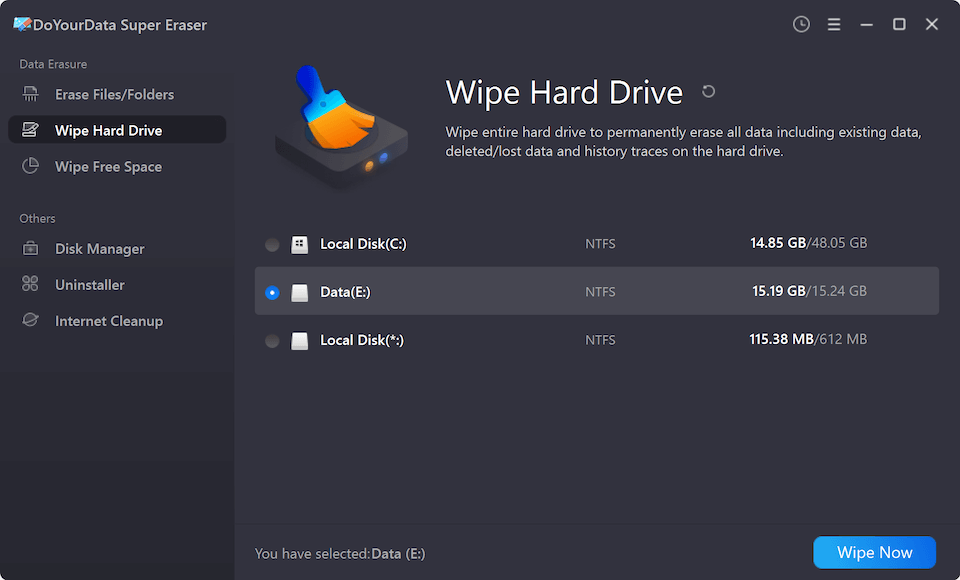
Launch DoYourData Super Eraser. You will see a clean, easy-to-navigate dashboard with multiple tabs depending on what you want to achieve. If you want to wipe an entire local drive before selling your computer, choose the 'Erase Hard Drive' mode. The software will scan and display all connected storage media, including your main system drive, secondary partitions, and external USB drives. Carefully select the specific local drive you wish to clean from the list.
Step 3: Select the Data Erasure Standard
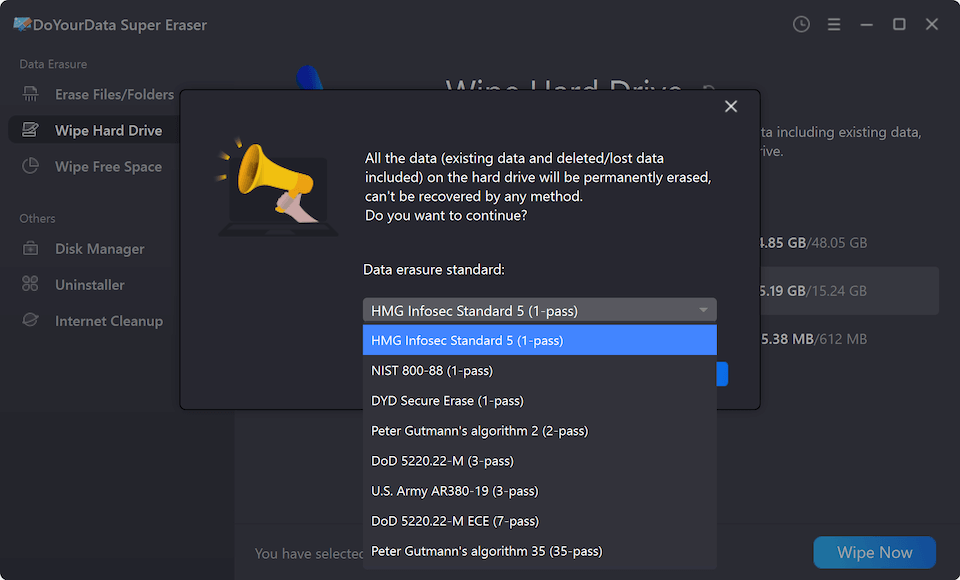
Click the 'Erase Now' button and then you need to select a data wiping method. The software supports different kinds of certified data erasure algorithms. Check and choose one from the drop-down list.
Step 4: Execute the Permanent Wipe
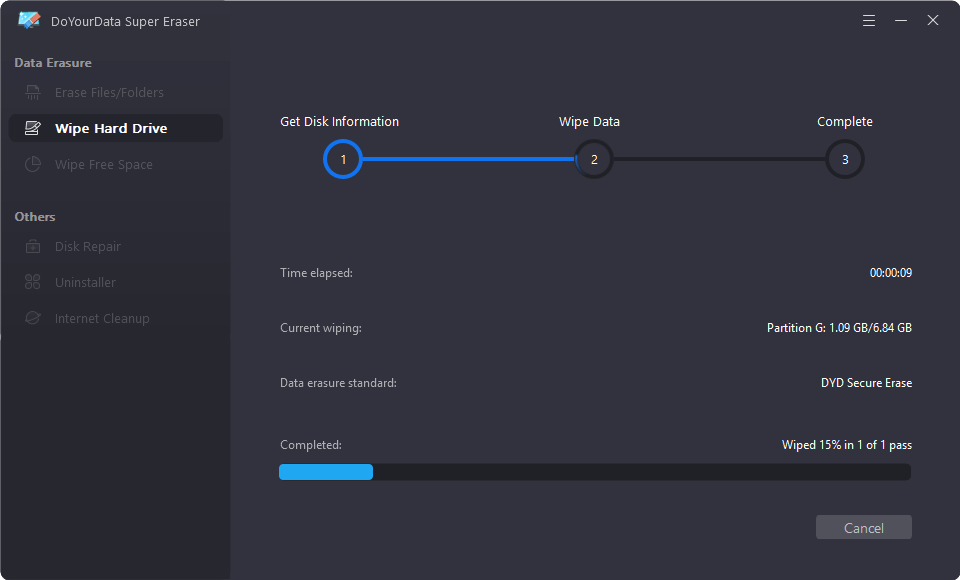
After confirming the data wiping methods, click "Continue" button to start wiping. DoYourData Super Eraser will execute the certified wiping algorithm, overwriting every sector until the drive is 100% clean and safe.
FAQs about Certified Data Erasure Program
Final Thoughts
Protecting your private information is essential whenever you upgrade, sell, or recycle computer hardware. Never rely on simple file deletion or quick formatting to keep your data safe. By using a certified data erasure program like DoYourData Super Eraser, you can wipe your local drives with total confidence and absolute peace of mind.
DoYourData Super Eraser
DoYourData Super Eraser, the award-winning data erasure software, offers certified data erasure standards including U.S. Army AR380-19, DoD 5220.22-M ECE to help you securely and permanently erase data from PC, Mac, HDD, SSD, USB drive, memory card or other device, make data be lost forever, unrecoverable!
Written & Updated by Shirly Chen
Shirly Chen has been writing data recovery, data erasure articles for DoYourData over 4 years. She has been working as a professional website content writer & editor for quite a long time. She also writes articles about disk clone, Mac optimization, disk backup, etc.