Permanently Wipe Seagate Drive Using Disk Wipe Software
Seagate hard drives are among the most trusted digital storage devices globally. However, you might be upgrading to a higher-capacity drive, selling your old computer, or simply disposing of a degraded external drive. How do you ensure your private data don't end up in the wrong hands? DoYourData Super Eraser can help you permanently wipe data and prevent data recovery.
 Updated by Shirly Chen on September 3, 2026
Quick Navigation:
- Why You Need Specified Seagate Disk Wipe Software
- Evaluating Built-in Utilities vs. Dedicated Software
- Why Choose DoYourData Super Eraser for Seagate Disks?
- Common Scenarios for Wiping a Seagate Hard Drive
- FAQs about Seagate Disk Wipe Software
- Conclusion
Many users mistakenly believe that deleting files and emptying the Recycle Bin is enough. Others rely on standard disk formatting. Unfortunately, these basic actions leave your actual data completely intact and easily recoverable. If you want to prevent data leaks, you need a dedicated Seagate disk wipe software that overwrites every storage sector with random binary patterns or zeroes, making recovery 100% impossible.
In this comprehensive guide, we will explore why standard formatting fails, analyze built-in erasure tools, and demonstrate how to permanently wipe your Seagate drive using DoYourData Super Eraser—the ultimate solution for military-grade data destruction.
Why You Need Specified Seagate Disk Wipe Software
To understand why specialized wiping tools are required, it helps to know how operating systems store data. When you store a file on your Seagate drive, the operating system creates two components: the physical data blocks on the disk platters (or flash chips) and a directory entry (like a file table) that points to where those blocks are located.
1. Standard File Deletion
When you delete a file and empty your Recycle Bin, Windows or macOS simply marks that specific directory entry as 'free space.' The actual content of your file remains completely untouched on the disk platters until new data happens to overwrite it. Anyone using a free data recovery tool can scan the drive and restore your files in minutes.
2. Quick Format vs. Full Format
A 'Quick Format' rebuilds the file system table without scanning or overwriting the underlying data sectors. A 'Full Format' in modern Windows versions writes zeroes across the disk, but it lacks advanced multi-pass overwriting standards, does not generate deletion audit logs, and often fails to clean unused sectors, hidden partitions, or corrupted sectors. Furthermore, formatting does not meet compliance standards for corporate or regulatory privacy rules (such as GDPR, HIPAA, or PCI-DSS).
3. Why True Data Wiping Matters
True data wiping (also known as data sanitization or disk destruction) involves systematically overwriting every single sector of the physical drive with zeroes, ones, or random characters across one or multiple passes. Once overwritten, the original magnetic or electronic signals are permanently destroyed. No software, hardware tool, or forensic lab can recover a single byte.
Evaluating Built-in Utilities vs. Dedicated Software
When searching for a Seagate disk wipe software, users often encounter several native tools or command-line scripts. Let's briefly compare these solutions to see where they excel and where they fall short.
1. Seagate SeaTools & Instant Secure Erase (ISE)
Seagate provides native utilities like SeaTools and SeaChest. For specialized Self-Encrypting Drives (SED), Seagate supports Instant Secure Erase (ISE), which destroys the drive's cryptographic encryption key in seconds.
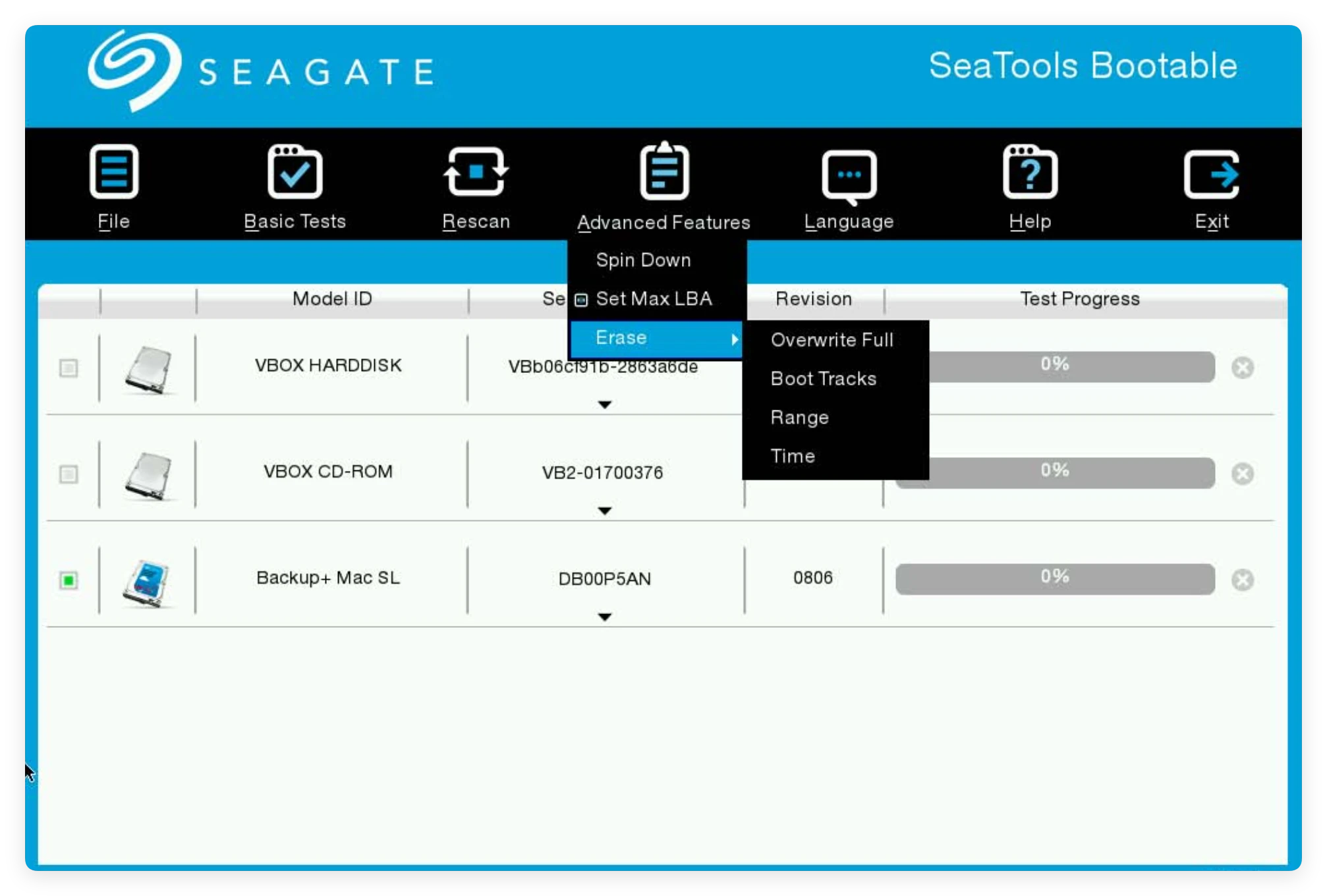
However, ISE only works on specific, higher-end SED models and requires entering a 32-character Physical Security ID (PSID). For non-SED external drives, standard users often find SeaTools difficult to navigate, and its basic overwrite function can take many hours without providing flexible multi-pass standards or user-friendly status reports.
2. Windows Diskpart 'Clean All' Command
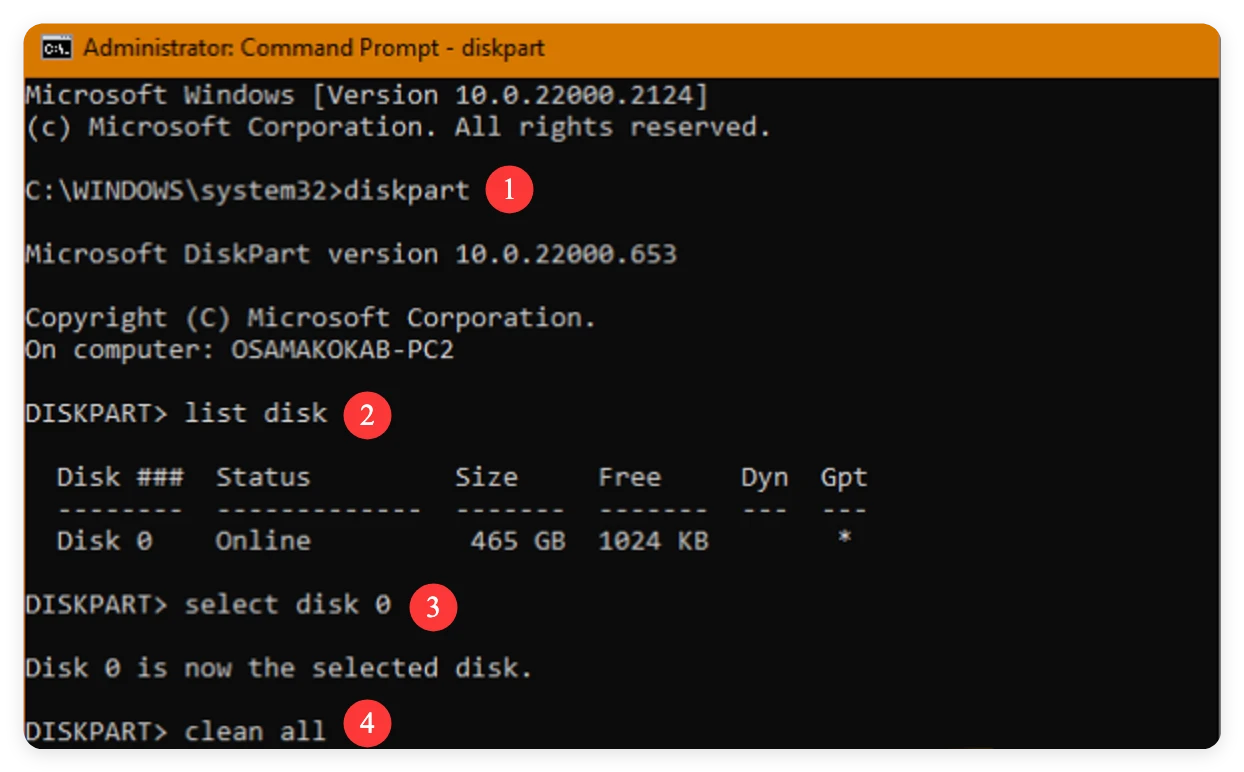
Windows includes a command-line tool called Diskpart. Running the command clean all writes zeroes to every sector of a selected drive. While effective for basic zero-filling, Diskpart offers zero visual progress feedback, requires administrative command-line expertise, and carries a high risk: selecting the wrong disk number can instantly wipe your primary system drive without confirmation warnings.
3. Third-Party Data Erasure Software (The Optimal Choice)
A dedicated third-party tool like DoYourData Super Eraser bridges all these gaps. It provides a graphical interface, supports both Windows and macOS, works seamlessly with all Seagate HDDs and SSDs, and offers certified international data sanitization algorithms.
Why Choose DoYourData Super Eraser for Seagate Disks?
DoYourData Super Eraser is a powerful, reliable, and user-friendly data wiping tool engineered to permanently destroy data from HDDs, SSDs, USB flash drives, SD cards, and external hard drives—including the entire line of Seagate products (One Touch, Backup Plus, Expansion, FireCuda, IronWolf, and Barracuda).
DoYourData Super Eraser
- The most safe and reliable disk wipe software for Seagate.
- Wipe entire Seagate disk to ensure all data is gone forever.
- Shred specified files or permanently erase deleted files.
Key advantages of using DoYourData Super Eraser include:
- 100% Irrecoverable Data Destruction: Overwrites target sectors multiple times using government-grade sanitization algorithms. Once wiped, data cannot be recovered by any software or physical recovery laboratory.
- Flexible Erasure Modes: Choose between wiping individual files/folders, formatting and wiping an entire hard partition/drive, or wiping only the 'Free Space' to erase deleted files without affecting current operational data.
- Broad Hardware Compatibility: Supports all Seagate external desktop and portable drives, internal SATA HDDs, PCIe NVMe SSDs, hybrid SSHDs, and RAID arrays.
- Protection for Drive Lifespan: Optimized algorithms ensure efficient sector overwriting, minimizing unnecessary wear and tear on solid-state storage chips.
- Cross-Platform Support: Fully compatible with Windows 11/10/8/7/Vista/Server and macOS Golden Gate, Tahoe, Sequoia, and earlier versions.
Step-by-Step Guide: How to Permanently Wipe a Seagate Drive
Wiping a Seagate hard drive with DoYourData Super Eraser is simple and straightforward. Follow these three steps to permanently erase all data from your drive.
Note: Data wiping is completely irreversible. Ensure you have backed up any critical files from your Seagate drive to another safe location (such as cloud storage or a secondary drive) before proceeding.
Step 1: Select the Data Wiping Mode & Choose Your Seagate Disk
Download, install, and launch DoYourData Super Eraser on your PC or Mac. Connect your Seagate external hard drive using a USB cable (or ensure your internal Seagate drive is recognized by your computer).
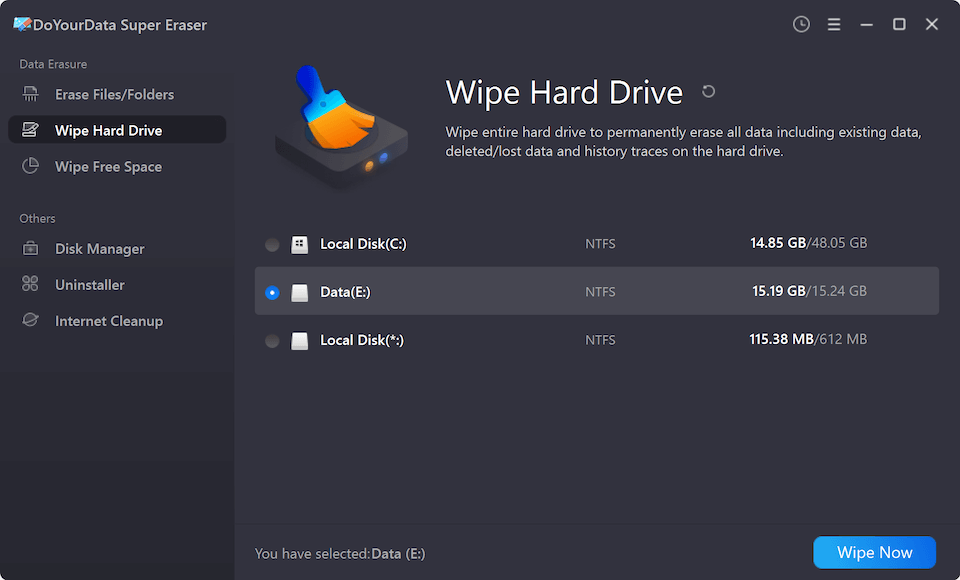
In the main interface, you will see three distinct wiping modes:
- Erase Files/Folders: Allows you to selectively delete specific confidential files or folders.
- Wipe Hard Drive: Completely wipes an entire hard drive partition or whole external Seagate disk, destroying all existing and deleted data.
- Wipe Free Space: Wipes only the unused disk space to render previously deleted files unrecoverable, while leaving existing files untouched.
To wipe your entire Seagate disk, choose Wipe Hard Drive. Next, select your Seagate disk from the drive list, and click the Wipe Now button.
Step 2: Choose a Recognized Data Erasure Standard
To meet different security requirements, DoYourData Super Eraser supports several international data erasure standards. Depending on your privacy needs, you can select from the following algorithms:
- HMG Infosec Standard 5 (1 pass): A fast standard algorithm suitable for everyday personal privacy.
- U.S. DoD 5220.22-M (3 passes): The United States Department of Defense standard, overwriting sectors three times for robust security.
- DOD 5220.22-M (ECE) (7 passes): An enhanced DoD multi-pass standard for highly sensitive commercial data.
- Peter Gutmann 35 Passes: The most comprehensive erasure method available, overwriting sectors 35 times for maximum cryptographic destruction.
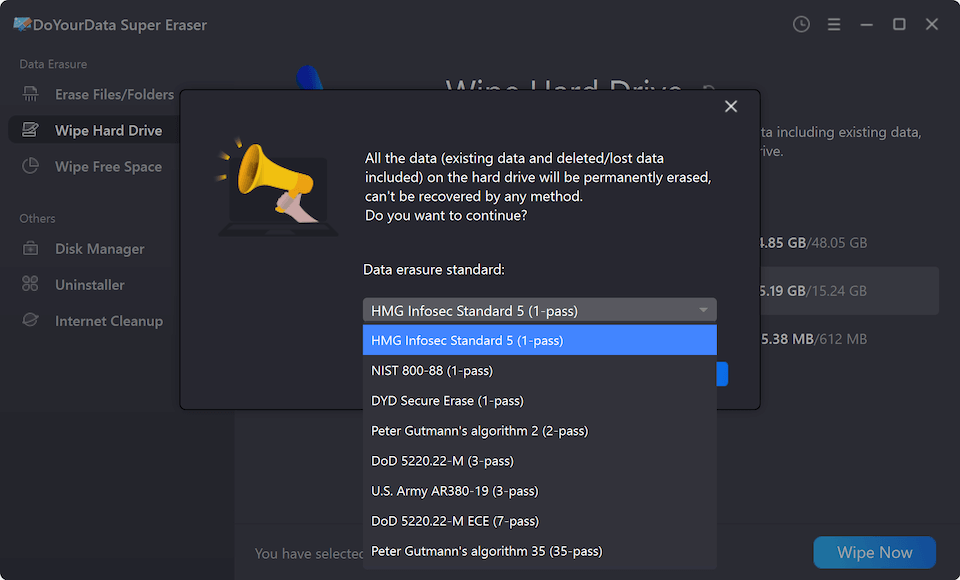
Step 3: Click Continue to Start Wiping Data
After choosing your preferred erasure standard, click the Continue button to initiate the wiping process. A confirmation dialog will appear warning you that the action cannot be undone.
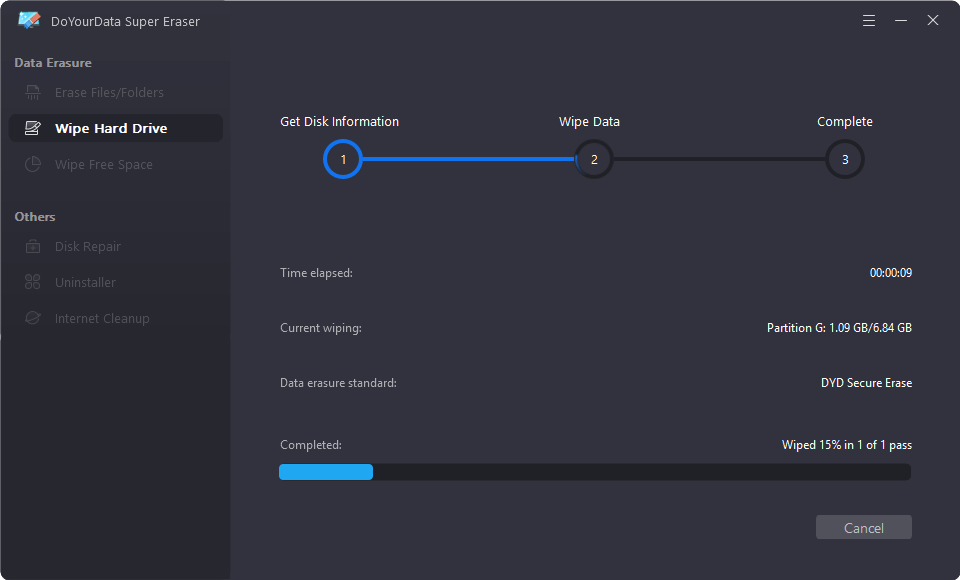
Confirm your selection, and the software will begin systematically overwriting every sector on your Seagate drive. A real-time progress bar will show the remaining time and percentage completed. Once finished, all data on the Seagate disk is permanently destroyed and completely unrecoverable.
Common Scenarios for Wiping a Seagate Hard Drive
There are several practical situations where running a dedicated Seagate disk wipe software is highly recommended:
- Selling or Donating a Used Drive: Before listing your Seagate external drive on eBay, Craigslist, or donating it, perform a full wipe to prevent strangers from accessing personal photos, tax records, or passwords.
- Returning a Work or Leased Computer: If your company laptop or leased storage array uses a Seagate hard drive, erasing all corporate files before returning the equipment prevents data breaches.
- Recycling or Disposing of Old Drives: Faulty or retired hard drives sitting in a storage drawer can still contain readable sectors. Wipe them permanently before dropping them at an electronic recycling facility.
- Fixing Corrupted or Raw Drives: When a Seagate drive becomes severely corrupted or displays 'RAW' file system errors, performing a full wipe resets all sectors, allowing you to repartition and format the drive fresh.
FAQs about Seagate Disk Wipe Software
Conclusion
Protecting your digital privacy requires more than just deleting files or performing a quick format. When it comes to disposing of, selling, or repurposing your Seagate external or internal hard drives, using a certified Seagate disk wipe software like DoYourData Super Eraser is the safest and most effective strategy.
With its intuitive 3-step process—selecting wiping mode, choosing an erasure standard, and clicking continue—DoYourData Super Eraser empowers both casual users and IT professionals to permanently destroy sensitive data without complex technical knowledge. Download DoYourData Super Eraser today to ensure your private information stays private forever!
DoYourData Super Eraser
DoYourData Super Eraser, the award-winning data erasure software, offers certified data erasure standards including U.S. Army AR380-19, DoD 5220.22-M ECE to help you securely and permanently erase data from PC, Mac, HDD, SSD, USB drive, memory card or other device, make data be lost forever, unrecoverable!
Written & Updated by Shirly Chen
Shirly Chen has been writing data recovery, data erasure articles for DoYourData over 4 years. She has been working as a professional website content writer & editor for quite a long time. She also writes articles about disk clone, Mac optimization, disk backup, etc.