IBM Computer Disk Wipe Tool: Safely Wipe IBM Servers (Windows Server)
Many enterprise administrators assume that formatting a hard drive or deleting partitions in Windows Disk Management is enough to clean a server. Unfortunately, with basic data recovery tools, unauthorized parties can easily bring back that confidential information. Fortunately, DoYourData Super Eraser can permanently wipe data to avoid data recovery.
 Updated by Shirly Chen on September 2, 2026
Quick Navigation:
- Understanding IBM Hardware Architecture & System
- Traditional Erase Methods vs. Disk Wipe Tools
- Data Erasure Solution for Windows Server
- How to Wipe Data on IBM Servers Drive
- Best Practices for IBM Server Decommissioning
- FAQs about Wiping IBM Computer Hard Drive
- Conclusion
IBM computers and enterprise servers hold some of the world's most sensitive business data. From financial ledgers and customer records to internal code and employee files, IBM hardware serves as the backbone for corporate infrastructure. However, when these machines reach the end of their lifecycle—or when drives need to be repurposed, upgraded, or returned to a leasing provider—getting rid of data safely becomes a top priority.
To prevent expensive data leaks, business identity theft, and compliance violations under regulations like GDPR, HIPAA, or PCI-DSS, you must use a dedicated IBM computer disk wipe tool. A professional data erasure solution overwrites raw drive sectors with random binary patterns, guaranteeing that data is 100% unrecoverable.
Understanding IBM Hardware Architecture & System
IBM server environments—ranging from legacy System x and eServer hardware to modern Lenovo System x models and IBM Power Systems—present unique storage configurations that require specialized handling before initiating a wipe.
Hardware RAID Controllers and Array Setup
IBM enterprise servers frequently rely on hardware RAID controllers (such as IBM ServeRAID, MegaRAID, or hardware SAS storage cards). Hardware RAID abstracts physical hard drives into logical volumes. When running a wipe utility, you need software that can either communicate with individual SAS/SATA drives directly or wipe the entire configured RAID logical volume securely within the operating system.
Windows Server Operating Systems
While legacy enterprise systems often ran AIX or Linux, a substantial portion of IBM server deployments run Microsoft Windows Server (including Windows Server 2025, 2022, 2019, 2016, 2012 R2, and 2008 R2). Standard consumer-grade disk wiping tools frequently crash or fail to launch on server operating systems due to system driver restrictions and administrative permission policies. Therefore, an enterprise-grade solution engineered specifically for Windows Server is required.
Traditional Erase Methods vs. Disk Wipe Tools
When server administrators look for an IBM computer disk wipe tool, they often evaluate multiple traditional methods. Let's look at how standard solutions compare against a dedicated data erasure utility.
- Windows Diskpart Command: Built-in command line tools like diskpart clean all write zeros across an entire drive. While effective for basic tasks, diskpart provides zero verification logs, cannot wipe individual files or free disk space, and lacks international compliance standards.
- Linux / AIX Native Commands: Commands such as dd or AIX diag format are common in Unix/Linux setups. However, they require extensive command-line knowledge, offer no user-friendly GUI, and pose a severe risk of accidentally wiping the wrong drive if a device path is misidentified.
- Legacy Bootable Utilities: Tools like DBAN (Darik's Boot and Nuke) operate outside the main OS. While popular, DBAN is unmaintained, lacks support for modern NVMe drives or modern RAID configurations, and cannot wipe unused space on an active Windows Server.
- Physical Destruction: Physical destruction (shredding or degaussing) guarantees data destruction but completely destroys valuable server hardware, making drive reuse or resale impossible while generating electronic waste.
- Dedicated Erasure Software: Specialized software like DoYourData Super Eraser provides high-level erasure standards (DoD 5220.22-M, NIST 800-88), flexible wiping modes, automated verification, and seamless operation within Windows Server environments.
Data Erasure Solution for Windows Server
DoYourData Super Eraser is a professional, certified data erasure software designed to permanently delete data from hard drives, SSDs, USB flash drives, memory cards, and RAID storage. Importantly, it offers full support for wiping data on IBM computers and servers running Windows Server operating systems.
DoYourData Super Eraser
- Support data erasure for Windows Server systems.
- The best disk wipe tool for IBM computers.
- Permanently erase data with certified algorithms.
Key Features of DoYourData Super Eraser
- 100% Irreversible Data Erasure: Completely overwrites target sectors, ensuring wiped data can never be recovered by any data recovery software or forensic specialist.
- Broad OS Compatibility: Fully compatible with Windows Server 2025, 2022, 2019, 2016, 2012, 2008, 2003, as well as Windows 11, 10, 8, and 7.
- Enterprise Hardware Support: Works seamlessly with IBM server storage, including SAS, SATA, SCSI, NVMe SSDs, external hard drives, and hardware RAID arrays.
- International Wiping Standards: Utilizes military-grade and industry-recognised data wiping algorithms, including HMG Infosec Standard 5, DoD 5220.22-M, US Army AR380-19, Peter Gutmann's algorithm, and NIST 800-88 standards.
- Flexible Erasure Modes: Provides three distinct erasure modes to fit any corporate scenario, from selective file deletion to complete server hard drive wiping.
How to Wipe Data on IBM Servers Drive
DoYourData Super Eraser provides an intuitive interface that simplifies server data destruction. Below are the three wiping methods available depending on your requirements.
Method 1: Selectively Wipe Files and Folders
If your IBM server is remaining in active service and you only need to destroy specific confidential files, databases, or client logs:
- Download and install DoYourData Super Eraser on your IBM computer running Windows Server.
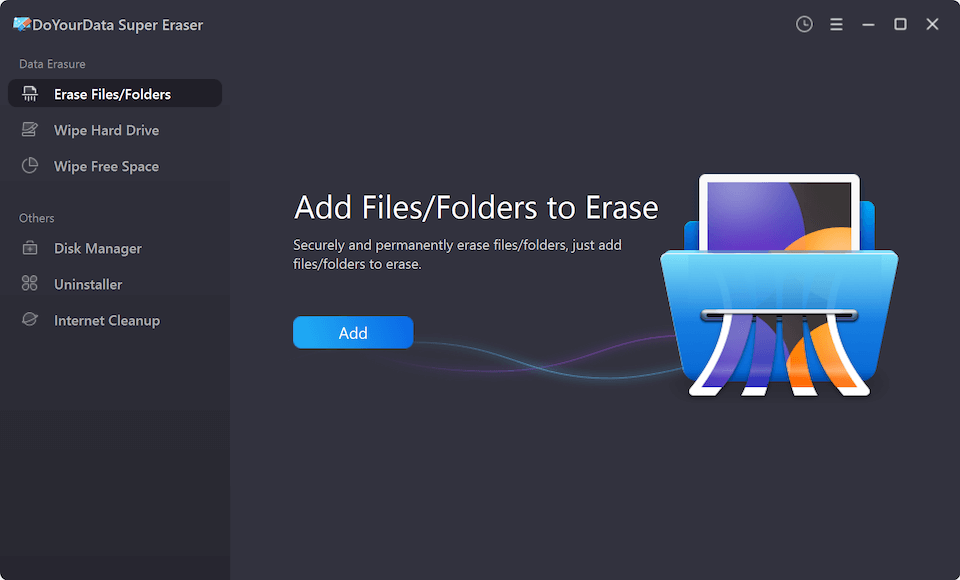
- Launch the software and select the 'Erase Files/Folders' tab.
- Click 'Add' to browse and select the specific files or folders you want to destroy.
- Click the 'Erase Now' button. The software will permanently destroy the selected items beyond recovery.
Method 2: Wipe Entire IBM Server Hard Drive or Partition
When decommissioning an IBM server drive, reallocating a storage partition, or clearing a secondary storage drive:
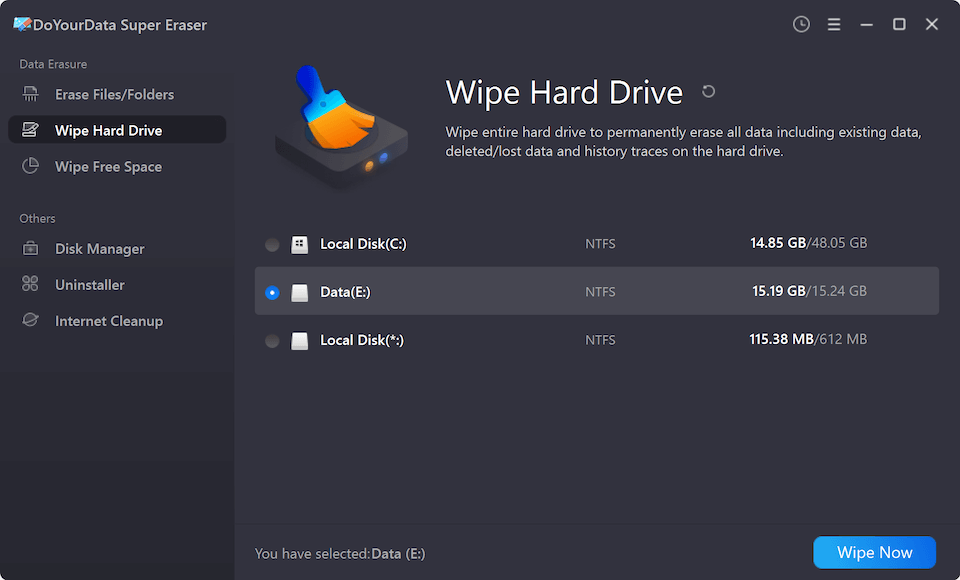
- Open DoYourData Super Eraser and choose the 'Wipe Hard Drive' option.
- Select the IBM hard drive partition, secondary volume, or external storage device you wish to wipe.
- Click 'Wipe Now' and confirm the operation. The tool will format and overwrite every sector on the chosen drive.
Method 3: Wipe Unused Disk Space (Free Space)
If you manually deleted sensitive server files in the past, those deleted items still reside in the drive's free space. To permanently sanitize this hidden data without affecting existing operational server files:
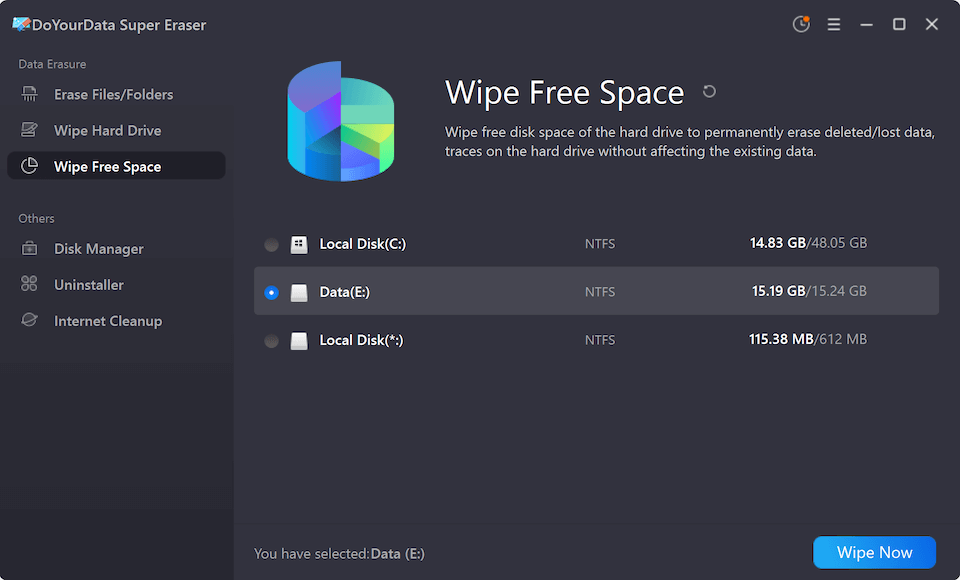
- Select the 'Wipe Free Space' tab in DoYourData Super Eraser.
- Choose the server partition where files were previously deleted.
- Click 'Wipe Now'. The software safely wipes the free space, destroying all traces of previously deleted files while keeping your current operating system and active data safe.
Best Practices for IBM Server Decommissioning
To guarantee a smooth and compliant server retirement process, IT administrators should follow a structured data sanitization checklist:
- Comprehensive Data Backup: Verify that all critical database records, configuration files, and system backups are safely transferred to offsite storage or new cloud instances.
- Clear Hardware Management Logs: Clear hardware-level log buffers, management consoles (such as IBM IMM or Lenovo XClarity Controller), and network credentials before wiping drives.
- Select Appropriate Wiping Standards: Select an erasure standard that aligns with your organization's legal compliance policies (e.g., DoD 3-pass for standard security, or NIST 800-88 for modern SSDs).
- Run Verification Scans: After wiping, attempt to run a reputable data recovery tool on the sanitized drive to independently verify that zero data can be reconstructed.
- Maintain Erasure Documentation: Document drive serial numbers, wipe completion timestamps, and sanitization methods used to satisfy internal corporate auditing requirements.
FAQs about Wiping IBM Computer Hard Drive
Conclusion
Properly wiping sensitive corporate data from IBM computers and servers is essential for protecting business privacy and adhering to global security standards. Relying on simple file deletion or standard formatting leaves sensitive enterprise data exposed to recovery.
By utilizing a dedicated IBM computer disk wipe tool like DoYourData Super Eraser, server administrators can effortlessly purge sensitive files, wipe entire hard drive volumes, or clean unused disk space on Windows Server systems. Safeguard your business assets today by downloading DoYourData Super Eraser to ensure permanent, unrecoverable data erasure.
DoYourData Super Eraser
DoYourData Super Eraser, the award-winning data erasure software, offers certified data erasure standards including U.S. Army AR380-19, DoD 5220.22-M ECE to help you securely and permanently erase data from PC, Mac, HDD, SSD, USB drive, memory card or other device, make data be lost forever, unrecoverable!
Written & Updated by Shirly Chen
Shirly Chen has been writing data recovery, data erasure articles for DoYourData over 4 years. She has been working as a professional website content writer & editor for quite a long time. She also writes articles about disk clone, Mac optimization, disk backup, etc.