How to Permanently Shred PDF Invoices from Local Storage Drive
Moving digital PDF invoices to the Recycle Bin/Trash or deleting them normally does NOT permanently remove them from your local hard drive or SSD. To permanently shred PDF invoices from local storage drive beyond recovery, you must use specialized file shredding software like DoYourData Super Eraser. The software supports military-grade data erasure standards (such as DoD 5220.22-M). Note that once shredded, these PDF files are 100% unrecoverable.
 Updated by Shirly Chen on October 12, 2026
Quick Navigation:
- Normal Deletion Leaves Your PDF Invoices Vulnerable
- Permanently Shred PDF Invoices from Local Storage Drive
- Best Practices for Managing Digital PDF Invoices Safely
- FAQs about Shredding PDF Invoices
- Conclusion
PDF invoices contain some of your most sensitive personal and business information. From banking account numbers, tax identification details, and home addresses to client names and billing totals, digital invoice files are a goldmine for cybercriminals and corporate spies.
If you are selling your laptop, upgrading your desktop storage drive, returning a office computer, or simply performing routine digital cleanup, disposing of financial records safely is essential. Leaving old PDF invoices on your hard drive or SSD leaves you exposed to data privacy breaches and identity theft.

Many users assume that dragging a PDF invoice into the Recycle Bin or pressing Shift + Delete completely wipes it out. Unfortunately, that is not true. In this guide, we will explain why normal deletion fails and show you step-by-step how to permanently shred PDF invoices from local storage drive using DoYourData Super Eraser.
Normal Deletion Leaves Your PDF Invoices Vulnerable
When you delete a PDF invoice on Windows or Mac, your computer's operating system does not actually destroy the contents of the file.
1. Operating Systems Only Remove File Links
Standard deletion merely deletes the file system's index pointer—the address that tells your computer where the file lives on the drive. The actual binary contents of your PDF invoice remain sitting on your local storage sectors untouched until new data overwrites them.
2. Commercial Data Recovery Tools Can Restore Deleted PDFs easily
Anyone who gains access to your computer or hard drive can run basic, publicly available file recovery software. Within seconds, these tools can scan your local drive and rebuild deleted PDF invoices completely intact.
3. Temporary Caches and Shadow Copies
Operating systems and PDF readers often create temporary backup files, cache copies, or system restore points. Standard deletion leaves these hidden residual traces behind on your drive sectors.
Permanently Shred PDF Invoices from Local Storage Drive
To ensure your financial PDF documents are destroyed forever, you need software that overwrites the storage sectors with random data patterns. DoYourData Super Eraser is a certified, easy-to-use data destruction software designed for both Windows PC and Mac.
DoYourData Super Eraser
- Shred specified files or folders permanently.
- Best data erasure tool for Windows and macOS.
- Support military-grade data erasure standards.
Follow these simple four steps to shred your PDF invoices safely:
Step 1: Select 'Erase Files/Folders' Mode
Download, install, and launch DoYourData Super Eraser on your computer. From the main screen, click on the 'Erase Files/Folders' mode. This option allows you to shred specific PDF files or target folders without affecting the rest of your computer system.
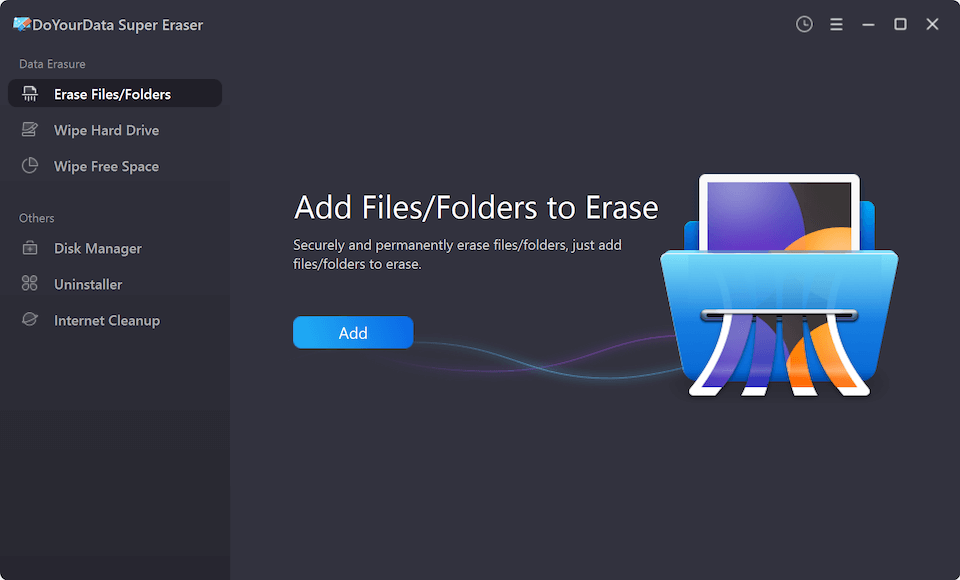
Step 2: Click 'Add' Button to Select the PDF Invoices You Want to Shred
Click the 'Add' button on the screen. A file browser window will pop up. Navigate to your local storage drive (C: drive, D: drive, desktop, or external storage) and choose the specific PDF invoices or invoice folders you want to shred.
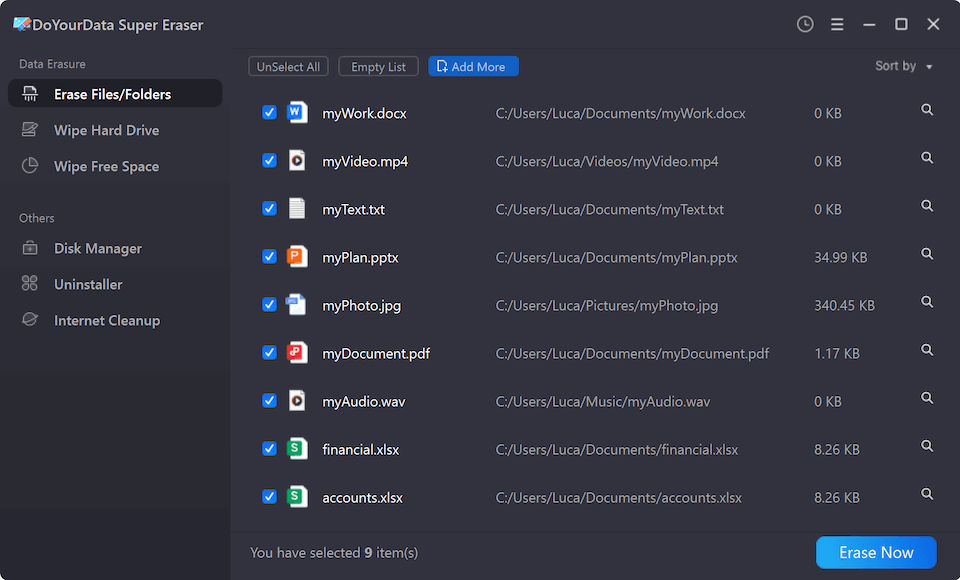
Step 3: Click 'Erase Now' and Select the Data Erasure Standard
After adding your PDF invoices to the list, click the 'Erase Now' button. Next, select your preferred data erasure standard algorithm (such as DoD 5220.22-M 3-pass or Gutmann 35-pass). These algorithms overwrite the exact disk locations where your PDF invoices were stored.
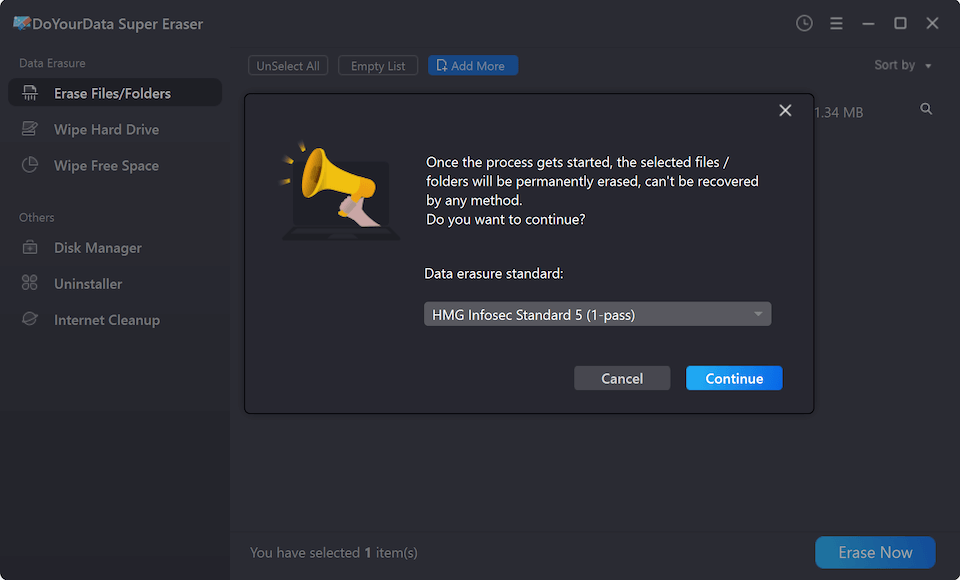
Step 4: Click 'Continue' Button to Start Shredding the Selected Files
Click the 'Continue' button to initiate the shredding operation. The software will overwrite the underlying binary data immediately.
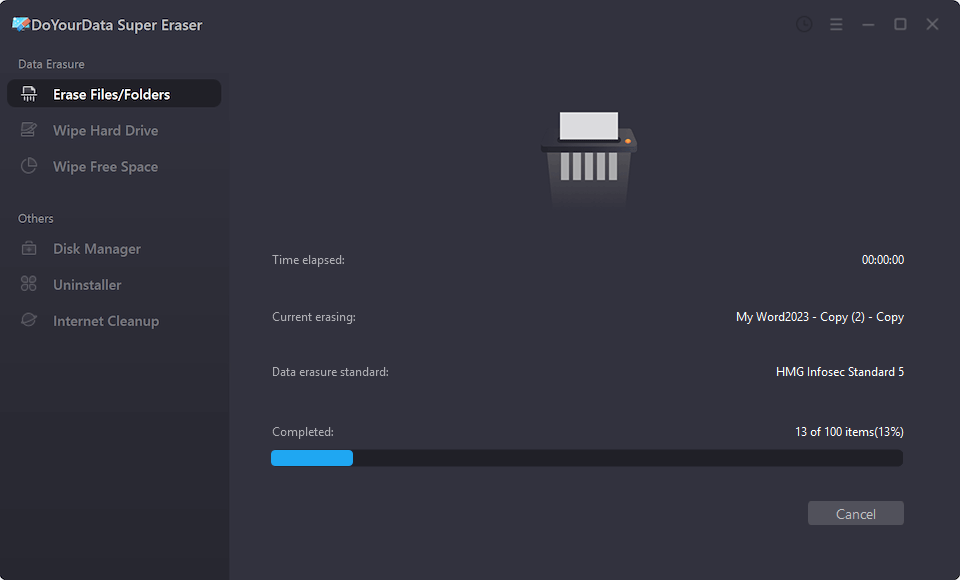
⚠️ Important Warning: The shredded files are no longer recoverable by any data recovery software, hardware specialist, or forensic laboratory. Please double-check and ensure you choose the right files before confirming the shredding process!
Understanding Certified Data Erasure Standards
DoYourData Super Eraser provides multiple international data destruction standards to ensure complete privacy compliance:
- HMG IS5 (1 Pass): Replaces data with simple zeros, perfect for quick everyday file cleanup.
- DoD 5220.22-M (3 Passes): Overwrites storage blocks with zeros, ones, and random characters in three sequential passes. This is the trusted standard for government and corporate security.
- U.S. Army AR380-19 (7 Passes): A 7-pass military-grade destruction protocol recommended for high-security financial and legal records.
- Peter Gutmann (35 Passes): Executes 35 random overwrite passes to guarantee 100% destruction against advanced hardware inspection tools.
Additional Scenarios for Complete Financial Data Protection
Besides shredding individual PDF invoices, DoYourData Super Eraser offers additional modes for thorough security coverage:
1. Clean Previously Deleted PDF Invoices (Wipe Free Space)
If you already deleted PDF invoices in the past using normal deletion, those files are still lingering in your drive's free space. Choose 'Wipe Free Space' mode in DoYourData Super Eraser to clean unused storage sectors without disturbing your existing active files.
2. Wipe Entire Storage Drive Before PC Resale
If you are selling, donating, or recycling your computer or external hard drive, choose 'Wipe Hard Drive' mode. This will wipe the entire storage drive completely clean, removing all current and past files in one step.
Best Practices for Managing Digital PDF Invoices Safely
Here are several helpful tips from cybersecurity experts to keep your invoice documents safe:
- Encrypt Active Records: Store your active PDF invoices in an encrypted folder or password-protected drive to prevent unauthorized access.
- Verify Tax Retention Policies: Before shredding local PDF invoices, ensure you have archived necessary tax records in accordance with local corporate retaining guidelines.
- Schedule Regular Shredding: Perform routine monthly file shredding for expired financial receipts, old bills, and temporary PDF invoices.
FAQs about Shredding PDF Invoices
Conclusion
Protecting your financial privacy requires taking proactive security measures. Leaving old PDF invoices sitting on your local storage drive—even after emptying the Recycle Bin—puts your personal and business security at risk.
Knowing how to permanently shred PDF invoices from local storage drive using DoYourData Super Eraser gives you absolute peace of mind. By overwriting storage sectors with certified military standards, you ensure that your sensitive billing documents remain private and unrecoverable forever.
DoYourData Super Eraser
DoYourData Super Eraser, the award-winning data erasure software, offers certified data erasure standards including U.S. Army AR380-19, DoD 5220.22-M ECE to help you securely and permanently erase data from PC, Mac, HDD, SSD, USB drive, memory card or other device, make data be lost forever, unrecoverable!
Written & Updated by Shirly Chen
Shirly Chen has been writing data recovery, data erasure articles for DoYourData over 4 years. She has been working as a professional website content writer & editor for quite a long time. She also writes articles about disk clone, Mac optimization, disk backup, etc.