How to Permanently Erase Photos from Digital Camera Memory Card?
Pressing 'Delete' or formatting a digital camera memory card (SD card, MicroSD, or CompactFlash) does NOT permanently erase your photos. Standard deletion only removes file pointer entries, leaving the actual image data hidden in storage blocks until overwritten. To permanently erase photos from digital camera memory card so they cannot be recovered by any software, you must use specialized data erasure software like DoYourData Super Eraser to overwrite the disk sectors with military-grade standards (such as DoD 5220.22-M or Gutmann).
 Updated by Shirly Chen on October 10, 2026
Quick Navigation:
- Deleting or Formatting Does NOT Permanently Erase Photos
- How to Permanently Erase Photos from Digital Camera Memory Card
- Best Practices to Keep Camera Memory Cards Healthy and Secure
- FAQs about Erase Photos from Digital Camera Memory Card
- Conclusion
Whether you are upgrading to a new digital camera, selling your used SD card, sending your camera for repair, or simply protecting personal snapshots, data privacy is crucial. Many photographers assume that hitting 'Delete All' in the camera menu or formatting the memory card on a computer keeps their private photos safe from prying eyes.
Unfortunately, that assumption is incorrect. Standard deletion and regular formatting leave your photo files largely intact. Anyone equipped with basic, free data recovery software can retrieve your deleted pictures in just a few clicks.

If you want to ensure your sensitive photos, raw files, and personal videos are wiped forever, this guide provides a step-by-step walkthrough. We will explain why traditional methods fail, compare different erasure standards, and show you exactly how to permanently erase photos from digital camera memory card using DoYourData Super Eraser.
Deleting or Formatting Does NOT Permanently Erase Photos
To understand how to wipe a camera card permanently, it helps to understand how flash memory cards (such as SD, MicroSD, and CompactFlash cards) store data.
1. The Camera 'Delete' Button
When you delete a photo directly on your Canon, Nikon, Sony, or Fujifilm camera, the camera does not touch the actual photo data stored on the flash memory cells. Instead, it merely marks the file's index entry as 'available space.' The photo remains fully intact in the background until new photos overwrite those exact memory blocks.
2. Quick Format vs. Low-Level Format
Formatting a card in your camera or via Windows File Explorer / Mac Finder recreates the file system table. It clears the directory structure, making the memory card look completely empty. However, the binary code of your photos still resides on the memory card sectors. Commercial data recovery programs can easily scan the card and restore every image.
3. Wear Leveling and Flash Memory Architecture
Digital camera memory cards use NAND flash memory governed by wear-leveling controllers. These controllers distribute data evenly across physical storage blocks to maximize lifespan. Because of this architecture, simple drag-and-drop file deletions fail to clean hidden wear-leveling blocks, leaving residual photo data exposed.
Method Comparison: Standard Deletion vs. Data Erasure
Here is a quick comparison showing how different methods affect your photos and privacy:
| Method | Are Photos Gone? | Can Data Be Recovered? | Privacy Protection Level |
|---|---|---|---|
| Camera 'Delete All' | No (Index hidden) | Yes (Very Easy) | Low (Unsafe) |
| Computer Quick Format | No (Table cleared) | Yes (Easy) | Medium-Low (Unsafe) |
| DoYourData Super Eraser | Yes (Data overwritten) | No (100% Impossible) | Maximum (Military Grade) |
How to Permanently Erase Photos from Digital Camera Memory Card
To permanently destroy photo data beyond any possibility of recovery, you need professional data erasure software. DoYourData Super Eraser is a certified data wiping tool designed to securely overwrite memory cards, USB drives, HDDs, and SSDs without causing physical hardware damage.
DoYourData Super Eraser
- Permanently erase photos to prevent data recovery.
- Support wiping memory card, pen drive, SSD/HDD, etc.
- Shred specified files, wipe deleted data or erase drive.
DoYourData Super Eraser offers three distinct erasure modes depending on whether you want to destroy specific photos, wipe the entire card, or clean up already-deleted files.
Preparation Steps Before Erasure
- Connect Your Memory Card: Take out the SD card, MicroSD card, or CompactFlash card from your camera and insert it into your computer using an SD card reader or adapter.
- Backup Essential Files: Ensure you have transferred any important photos or videos to your computer or external hard drive. Data erased by DoYourData Super Eraser cannot be recovered by any means.
- Download DoYourData Super Eraser: Download and install DoYourData Super Eraser on your Windows PC or Mac computer.
Mode 1: Permanently Erase Selected Photos from Camera Card
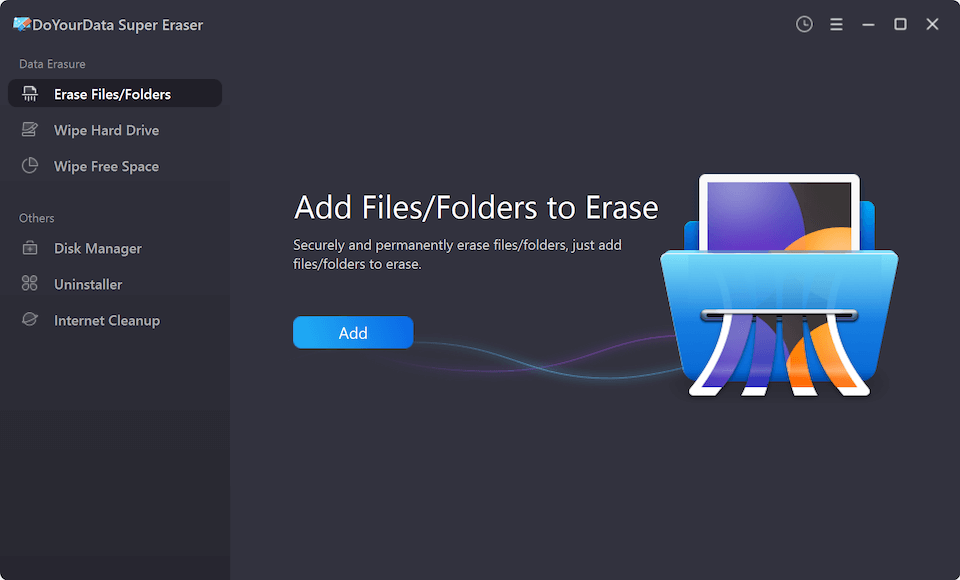
If you only want to wipe specific sensitive photos or video files while leaving other pictures on your memory card intact, follow these steps:
Step 1: Launch DoYourData Super Eraser and choose the 'Erase Files/Folders' mode on the main menu.
Step 2: Click 'Add' to browse your connected digital camera memory card and select the specific photo files or image folders you want to destroy.
Step 3: Click the 'Erase Now' button. The software will overwrite the selected files and zero out their storage blocks immediately.
Mode 2: Complete Memory Card Wipe (Recommended for Resale/Donation)
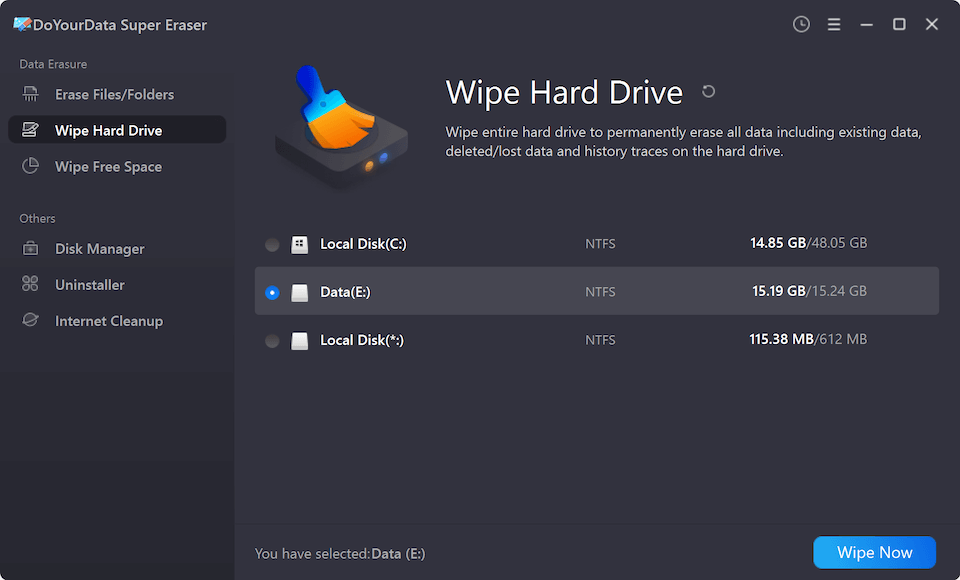
If you plan to sell, donate, or recycle your camera memory card, you should completely wipe the entire drive to eliminate all current and historical records:
Step 1: Open DoYourData Super Eraser and select the 'Wipe Hard Drive' mode.
Step 2: Choose your digital camera memory card from the device list.
Step 3: Click 'Wipe Now'. The program will erase all existing photos and completely overwrite all free space, wiping out every trace of past data.
Mode 3: Wipe Free Space (Clean Previously Deleted Photos)
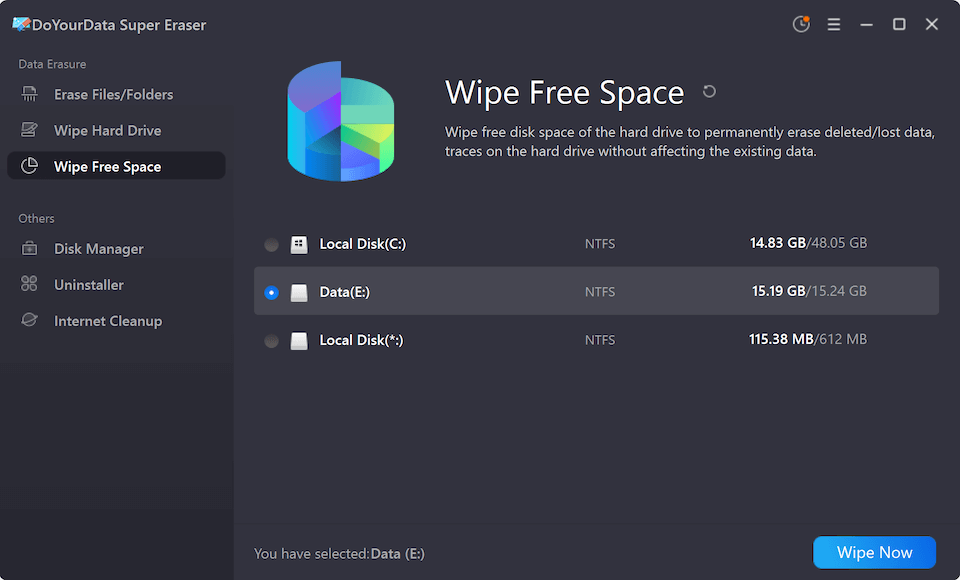
If you already hit 'Delete' or formatted your card in-camera, the photos are still lurking in the free storage space. You can erase them without losing your current, newly taken photos:
Step 1: Select the 'Wipe Free Space' mode inside DoYourData Super Eraser.
Step 2: Choose your camera memory card from the partition list.
Step 3: Click 'Wipe Now'. This option safely wipes the unused storage space to permanently destroy all deleted photos while keeping your active files untouched.
Military-Grade Data Erasure Standards Supported
DoYourData Super Eraser employs internationally recognized data destruction protocols to guarantee 100% permanent data destruction:
- HMG IS5 (1 Pass): Writes zeros across all memory blocks, ideal for quick routine cleaning.
- DoD 5220.22-M (3 Passes): The official U.S. Department of Defense standard. It overwrites sectors with zeros, ones, and random characters across 3 sequential passes.
- U.S. Army AR380-19 (7 Passes): A highly rigorous standard recommended for military and financial security compliance.
- Peter Gutmann Standard (35 Passes): An extreme data destruction algorithm executing 35 overwrite passes, ensuring complete destruction against magnetic and electronic inspection.
Best Practices to Keep Camera Memory Cards Healthy and Secure
In addition to permanent data erasure, here are essential tips from professional photographers to keep your camera cards secure and working reliably:
- Format In-Camera Regularly: Always format your memory card inside your camera menu periodically after securing your backups. In-camera formatting refreshes file structure systems and reduces memory fragmentation.
- Safely Eject Hardware: Never pull out the memory card while the camera indicator light is flashing red or green. Abrupt removal can cause file system corruption and card errors.
- Always Wipe Before Transfer: Before selling, gifting, or returning a camera or SD card, perform a complete card wipe using DoYourData Super Eraser to safeguard your private pictures.
FAQs about Erase Photos from Digital Camera Memory Card
Conclusion
Protecting your private photos requires more than just clearing your camera roll. Standard file deletion and camera formatting leave your personal images vulnerable to recovery tools.
To permanently erase photos from digital camera memory card, using dedicated data destruction software like DoYourData Super Eraser is the ultimate solution. By overwriting storage sectors with certified military standards, you can rest easy knowing your private photos are gone forever.

DoYourData Super Eraser
DoYourData Super Eraser, the award-winning data erasure software, offers certified data erasure standards including U.S. Army AR380-19, DoD 5220.22-M ECE to help you securely and permanently erase data from PC, Mac, HDD, SSD, USB drive, memory card or other device, make data be lost forever, unrecoverable!
Written & Updated by Shirly Chen
Shirly Chen has been writing data recovery, data erasure articles for DoYourData over 4 years. She has been working as a professional website content writer & editor for quite a long time. She also writes articles about disk clone, Mac optimization, disk backup, etc.